A 2D simulation game where you heal a world you drew yourself, before its own decay makes it impassable. Built in Python with cmu_graphics, Pillow, and NumPy for my 15-112 final. You paint a grayscale heightmap, it becomes terrain, and then every cell starts to rot in real time — your only counter is a character whose healing radius pushes the decay back down.
Deterioration & Restoration (a.k.a. Can You Reverse Time?) is my solo final project for CMU 15-112 (Fundamentals of Programming, Fall 2024). The whole game is one tension held in a loop: the world is always decaying, and you are always healing, and the question is whether your reach grows faster than the rot spreads. There’s no combat and no enemies — the antagonist is entropy.
I built it in pure Python on the cmu_graphics canvas, with Pillow doing the image work and NumPy doing the array work. The interesting engineering is not the game logic; it’s making per-cell texture decay run at 60 fps on a 200×150 world when every visible cell is a freshly blended, resized image.
What it actually is
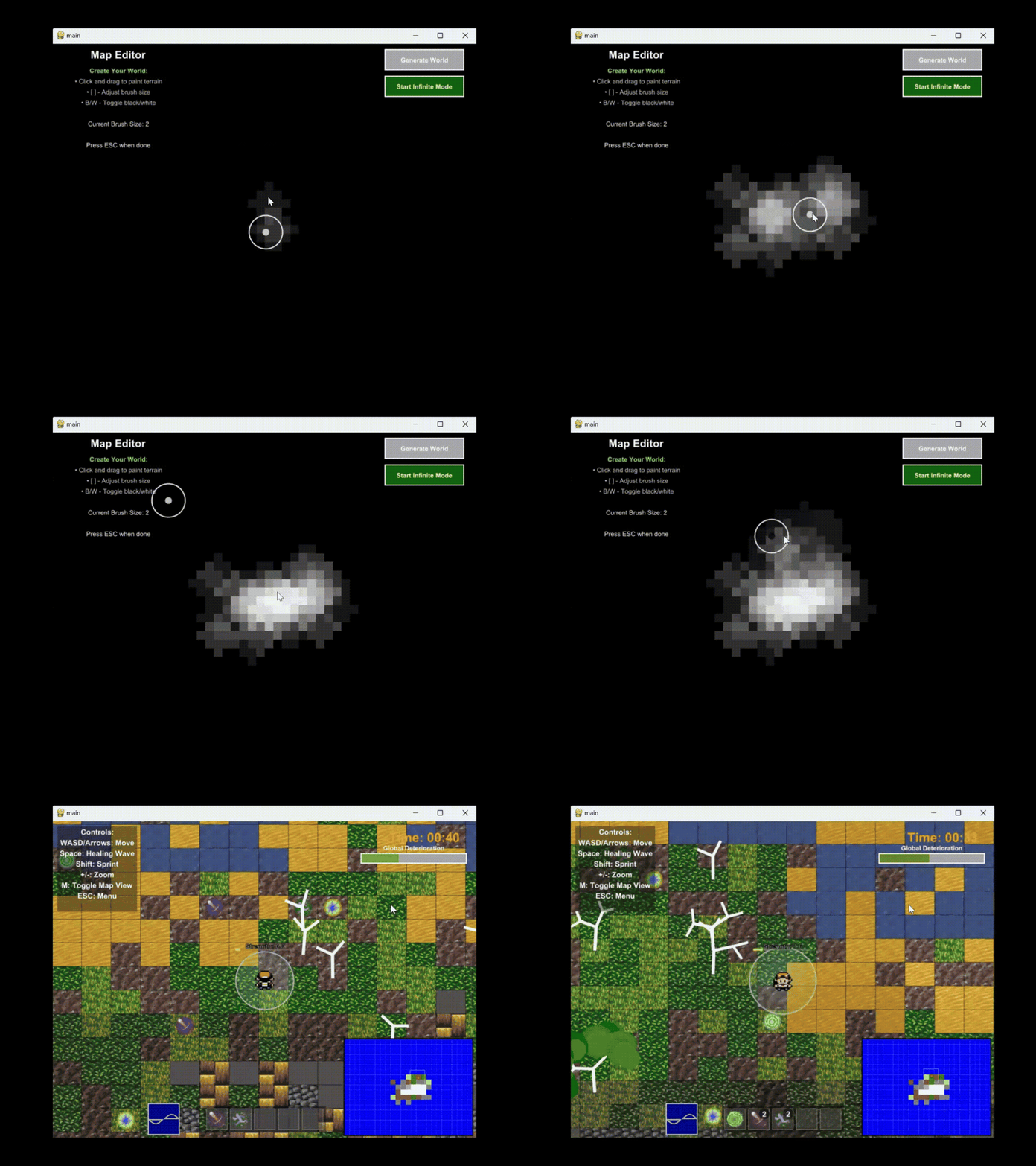
You don’t get a pre-made level. You draw one. The game opens in a map editor where you paint a grayscale image — bright = high ground, dark = water — and that image is the world. When you hit Generate World, the editor grid is upscaled into a 30,000-cell terrain map, each cell classified into a material by elevation. Then you drop in as a small four-directional character and the clock starts.
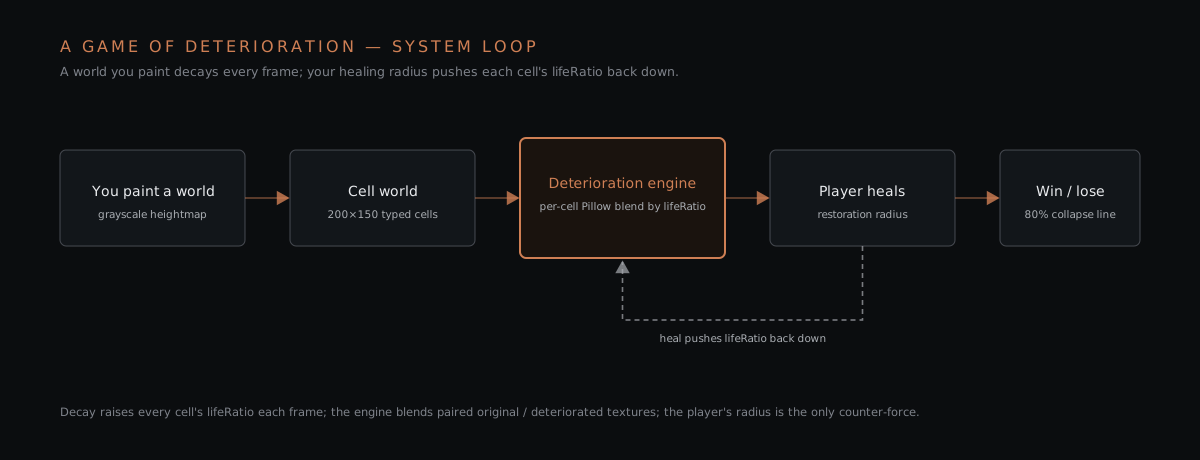
From that point the loop is:
- Decay — every non-water cell’s
lifeRatiocreeps up every frame. - Heal — the cells inside your restoration radius get pushed back down, scaled by your strength.
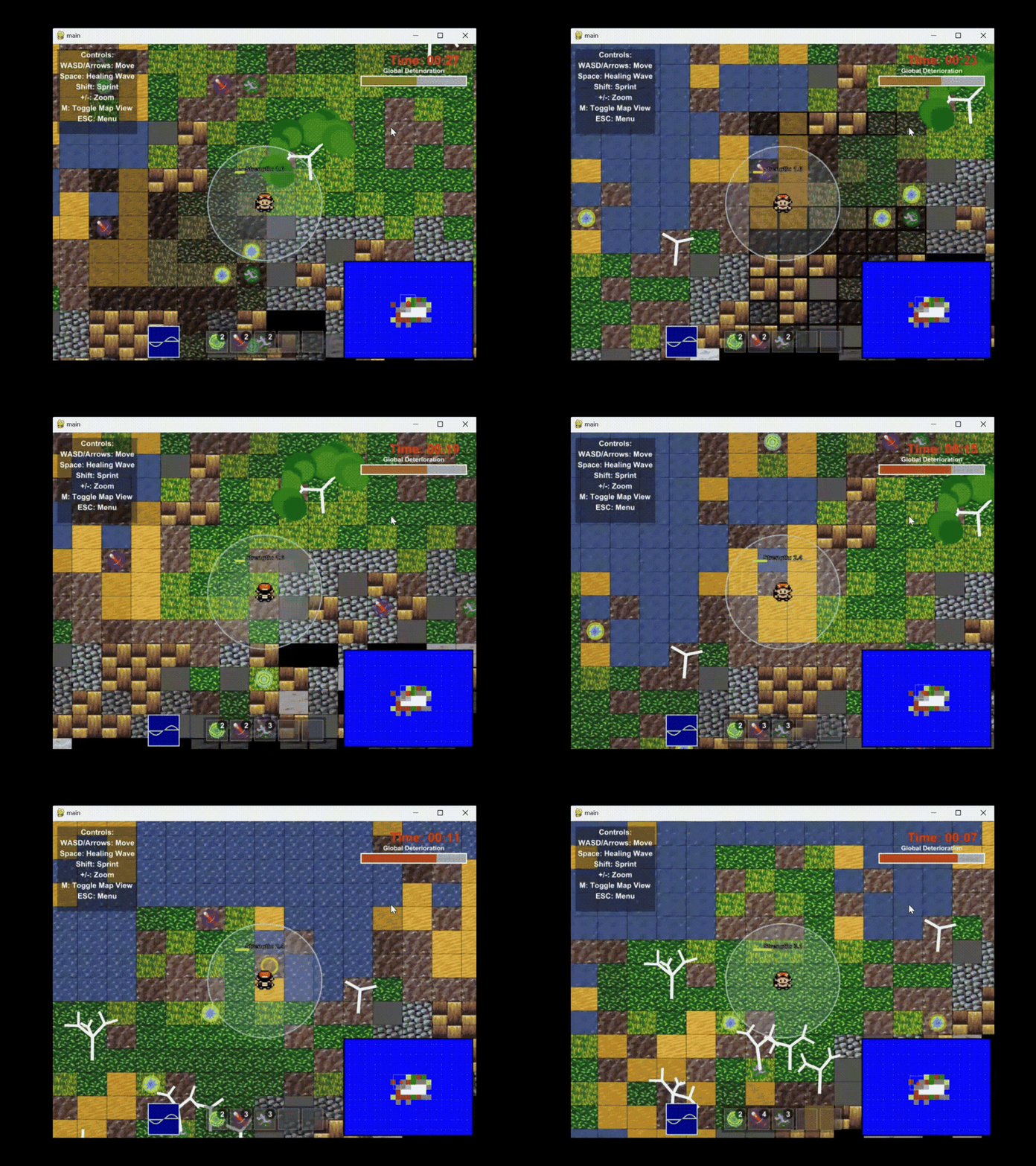
- Read the world — textures fade, fractal trees turn yellow → red → bare, and a global deterioration bar tells you how close the whole map is to collapse.
- Resolve — in Timed Mode you win by keeping global deterioration under 80% until the 60-second clock runs out; cross 80% and the run is lost.
How it works
1 · The world starts as an image you paint
The editor (map_editor.py) holds a low-resolution NumPy grid of grayscale values in [0, 1]. Painting isn’t pixel-by-pixel — the brush builds a circular mask with np.ogrid and opacity-blends the target value into the covered cells, so dragging feels like a soft airbrush rather than a hard stamp:
y, x = np.ogrid[-brushSize:brushSize+1, -brushSize:brushSize+1]
mask = x*x + y*y <= brushSize*brushSize          # circular brush
# for each masked cell:
grid[r, c] = current * (1 - opacity) + target * opacity
When you generate the world, that editor grid is upscaled 4× with np.repeat along both axes into a 200×150 array, seeded with a little uniform jitter, and smoothed against each cell’s 3×3 neighborhood. A _getTerrainType(height, avgHeight) function then maps elevation bands onto materials — water below 0.2, sand/dirt at the shoreline, grass and leaves on the low land, rocks and pavement higher up, brick and snow on the peaks. The output is a grid of per-cell dicts (terrain, texture, growthPotential), which is what the game actually plays on.
2 · The deterioration engine (the real core)
Decay is not a color filter — it’s a blend between two real textures. Every material ships as a pair: an original tile and a hand-deteriorated version (I edited the decayed variants in Photoshop from an OpenGameArt pixel pack). texture_manager.py keeps a lifeRatio per cell from 0 (pristine) to 1 (fully decayed), and the on-screen tile is:
Image.blend(original, deteriorated, lifeRatio) # Pillow, per cellWater is special-cased: instead of blending, it gets a sin-driven Gaussian blur so it visibly ripples, and it never deteriorates. Deterioration accrues at a fixed rate per step (water exempt); the character’s radius applies the opposite.
The hard part was performance. Naively you’d re-open, blend, and resize a Pillow image for all 30,000 cells every frame — that never hits 60 fps. Two decisions make it viable:
- A rounded-key render cache — each generated
CMUImageis keyed by(terrainType, width, height, round(lifeRatio, 2)). Rounding the float ratio to two decimals collapses thousands of near-identical decay states into a small, bounded set of cache entries, so a cell at 0.53 and 0.531 share one image. The cache is flushed every 30 update steps to bound memory. - Visible-only rebuilds — only cells inside the camera viewport (plus a 5-cell pad) are ever re-textured; the rest of the 200×150 world keeps its state but costs nothing to draw.
The image-cache design here was one place I explicitly used Claude 3.5 as a pair-programmer for the caching strategy and debugging — the repo comments mark those sections honestly, which matters for a 15-112 submission.
3 · Movement, healing, and power-ups
The character (character.py) moves on WASD/arrows with shift to sprint, animates a four-frame directional sprite, and carries a restoration radius. Each frame, game.update() walks the cells inside that radius and subtracts strength × 0.01 from their lifeRatio — so healing is spatial and continuous, not a click. Pressing space fires an expanding healing wave; the four power-up types are collected on contact and feed an inventory:
| Power-up | Effect |
|---|---|
| Speed | Faster movement |
| Radius | +8 to healing radius |
| Power | +0.75 healing strength |
| Burst | Instant strong heal over a 5×5 area (consumed on pickup) |
Decay also feeds back into movement: any cell whose lifeRatio reaches 0.8 becomes impassable. So a neglected corner of the map doesn’t just look bad — it walls itself off, which is what makes triage decisions real.
4 · Living feedback
The world tells you how it’s doing without a HUD. tree.py grows recursive fractal trees whose branch depth and leaf color track the average lifeRatio of the ground around them — healthy patches grow full green canopies, dying patches turn yellow, then red, then shed leaves. A global deterioration bar shifts green→red with the world’s overall health, and a minimap plus debug overlay (zoom, tree density, strength keys) let you inspect state on the fly.
5 · Two modes and a results screen
- Timed Mode — 60 seconds; keep global deterioration under 80% to win.
- Infinite Mode — no countdown; the world decays continuously and you end the run with E when you’re ready. While it runs, the game samples deterioration, power, speed, and radius over time.
Ending a run brings up a results screen that charts the two competing curves of the whole design — how fast the world decayed versus how fast your abilities grew.
What I took from it
This was the project where I stopped treating an image as something you display and started treating it as state you compute over — a per-cell lifeRatio field that drives rendering, pathability, and feedback all at once. The caching problem (how do you make thousands of live Pillow blends cheap?) is the same shape of problem I keep hitting in real-time graphics and CV work since: quantize the continuous input, cache the discretized result, and only ever compute what’s on screen.
Design-wise, the “deterioration” theme stuck. It became a throughline across my Fall 2024 work — the same idea of pristine-vs-decayed states, explored later as a texture-aging design tool and as a diffusion-driven façade installation (linked below).
Inspirations
- Don’t Starve, RimWorld, and Hyper Light Drifter for the 2D survival aesthetic and procedural-terrain ideas
- The “reverse time by healing” framing borrows from games that fuse resource management with real-time crisis mitigation
Solo term project final for 15-112 Fundamentals of Programming and Computer Science, Fall 2024. Python 3.6+ · cmu_graphics · Pillow · NumPy. Character sprite from Sandro Maglione’s pixel-art tutorial; base textures from an OpenGameArt pixel pack (deteriorated variants hand-edited).
Links
- GitHub repo
- Notion page (full write-up + asset samples)
- YouTube demo
- Local:
W:\CMU_Academics\Fall 2024 CMU\112 Term Project - Final - Submission\
Related cards
This “deterioration” theme became a cross-project motif in Fall 2024:
- [[2024-Fall—synthetic-texture-deterioration]] — the tool-side exploration (architectural texture aging as a design simulation)
- [[2024-Fall—spectral-facades]] — the installation-side exploration (diffusion-driven transition between pristine and decayed façades)