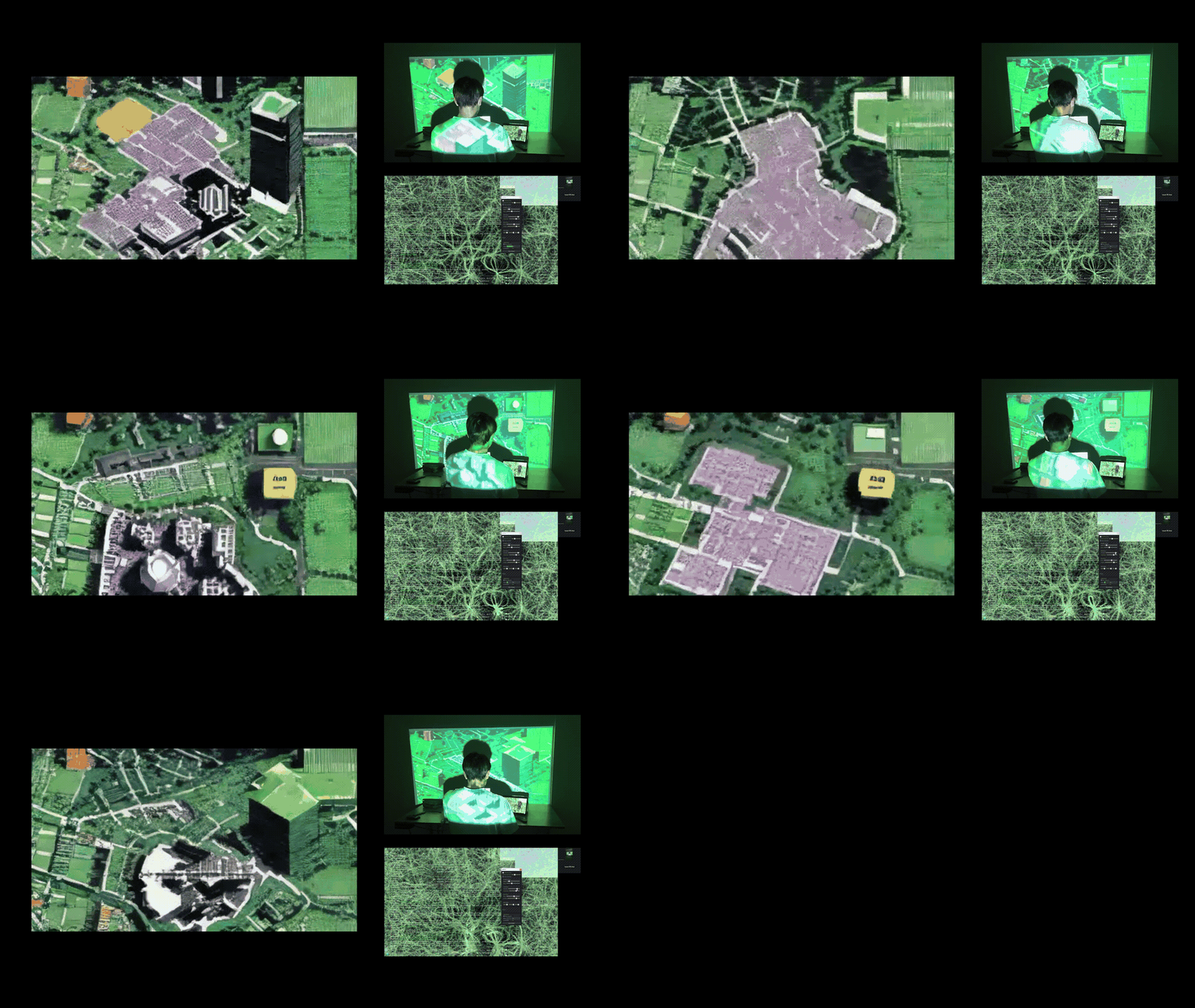
Extend human-computer interaction beyond the screen. The system projects real-time generative visuals into the physical workspace, driven by cursor, keyboard, posture, and live screen data — creating a feedback loop where the act of computing reshapes the ambient environment.
Introduction
This project builds on an earlier work titled “Real-Time Coding Adventure of the Bio-Cybernetic System.” The original project revolved around creating a “digital creature” that interacted with user input and environmental changes. Inspired by Physarum Polycephalum, it used mouse and webcam data to track light and motion, generating sequences that shifted the interface’s behavior. By occasionally obstructing the display and gradually returning to normal after a period of stillness, the system encouraged users to rethink their relationship with the screen — how feedback loops can disrupt the usual one-way interaction we have with interfaces, pushing for a more reflective and dynamic experience.
The project was grounded in ideas like performative idiom and circular causality. Performative idiom challenges the notion of fixed, pre-defined systems, focusing instead on processes that adapt and evolve in unpredictable ways — much like Ashby’s Homeostat or Pask’s Colloquy of Mobiles. Circular causality explores how feedback loops create systems that can self-regulate and respond to their environment. Together, these concepts shaped the project’s goal of questioning sedentary, mouse-driven interactions and reimagining them as active, multi-directional exchanges. But the original system was limited to what could happen within the boundaries of the computer screen.
Design the Ambience takes that further by using Stable Diffusion and projection mapping to create a dynamic ambient environment that responds to user interactions in real time. It tracks subtle inputs — mouse location, movement speed, typing rhythm, posture — and projects them into the physical space around the user. This creates a feedback loop that extends beyond the screen, allowing not only the user but also others nearby to engage with and influence the system.
Key changes in the new system:
- Going beyond the screen — projection mapping takes everyday interactions (mouse, keyboard) and translates them into ambient visuals that fill the surrounding environment
- Using generative AI — integrating StreamDiffusion, the system combines measurable data (movement speeds, posture) and qualitative inputs (text prompts, screen captures) to generate visuals that feel imaginative and alive
- Interactive projections — the projected environment becomes part of the interaction, giving users something new to react to and creating a back-and-forth exchange between the digital and physical spaces
The project pushes the boundaries of human-computer interaction by moving focus away from the computer itself and into the surrounding space. It highlights how small, often-overlooked actions like typing and mouse movements can shape the environment, inviting users to see their interactions differently and share the experience with others. By breaking out of the screen’s confines, it transforms a closed-loop system into something more open, interactive, and thought-provoking.
Equipment and computational pipeline setup
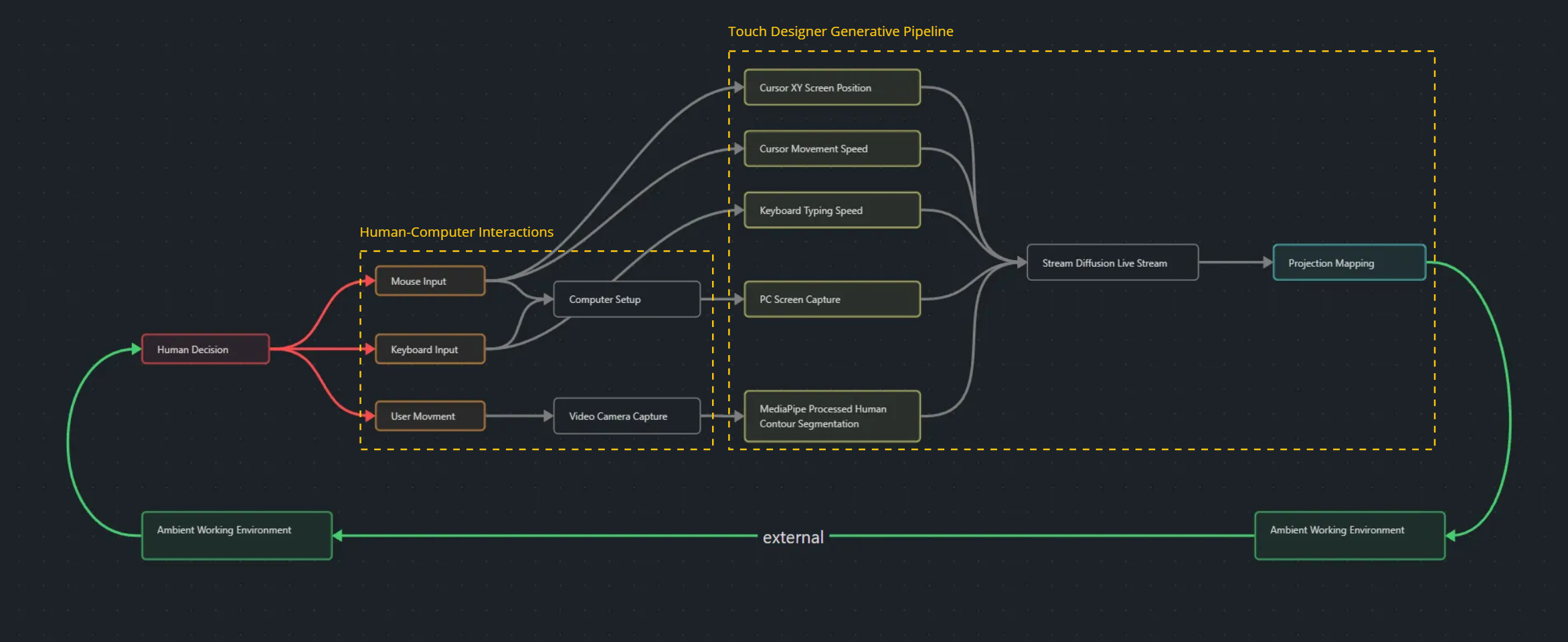
The workflow begins with the user deciding to interact with the computer. This interaction is captured through inputs such as mouse and keyboard usage, as well as the user’s physical movements. The inputs generate a range of system signals: cursor XY coordinates, cursor movement speed, keyboard typing speed, live PC screen captures, and human contour segmentation. Each input is processed and integrated into a computational pipeline, culminating in real-time generative visuals projected back into the user’s environment.
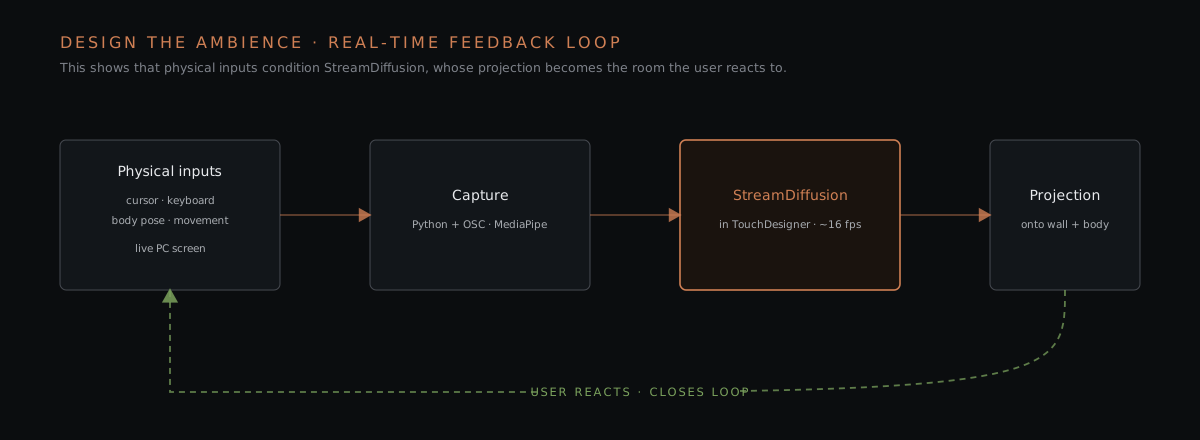
The original hand-drawn flowchart the diagram is based on used red lines for human input, grey for algorithmic processing, and green for the external projection back into the room — a three-colour convention this rebuilt version preserves.
System stack at a glance
| Stage | Component | Notes (from the build) |
|---|---|---|
| Cursor / keyboard capture | Python: pyQt5 + pynput | Standalone script; cursor XY, cursor speed, typing speed |
| Script → engine transport | TouchDesigner OSC module | Numeric channels streamed into the .toe project |
| Screen + body ingest | TouchDesigner + MediaPipe | Live PC screen grab; mediapipe-touchdesigner (torinmb) for human-contour segmentation |
| Real-time generation | StreamDiffusion (StreamDiffusionTD-0.2.2.tox) | Stable Diffusion img2img at ~16 fps, 514×514, fixed text prompt |
| Projection mapping | CamShnapper module | Contour cast onto the user’s back; rest onto the workspace |
| Capture hardware | DJI Osmo camera, projector, laptops, main PC | Osmo feeds the contour segmentation |
Input data capture and processing
-
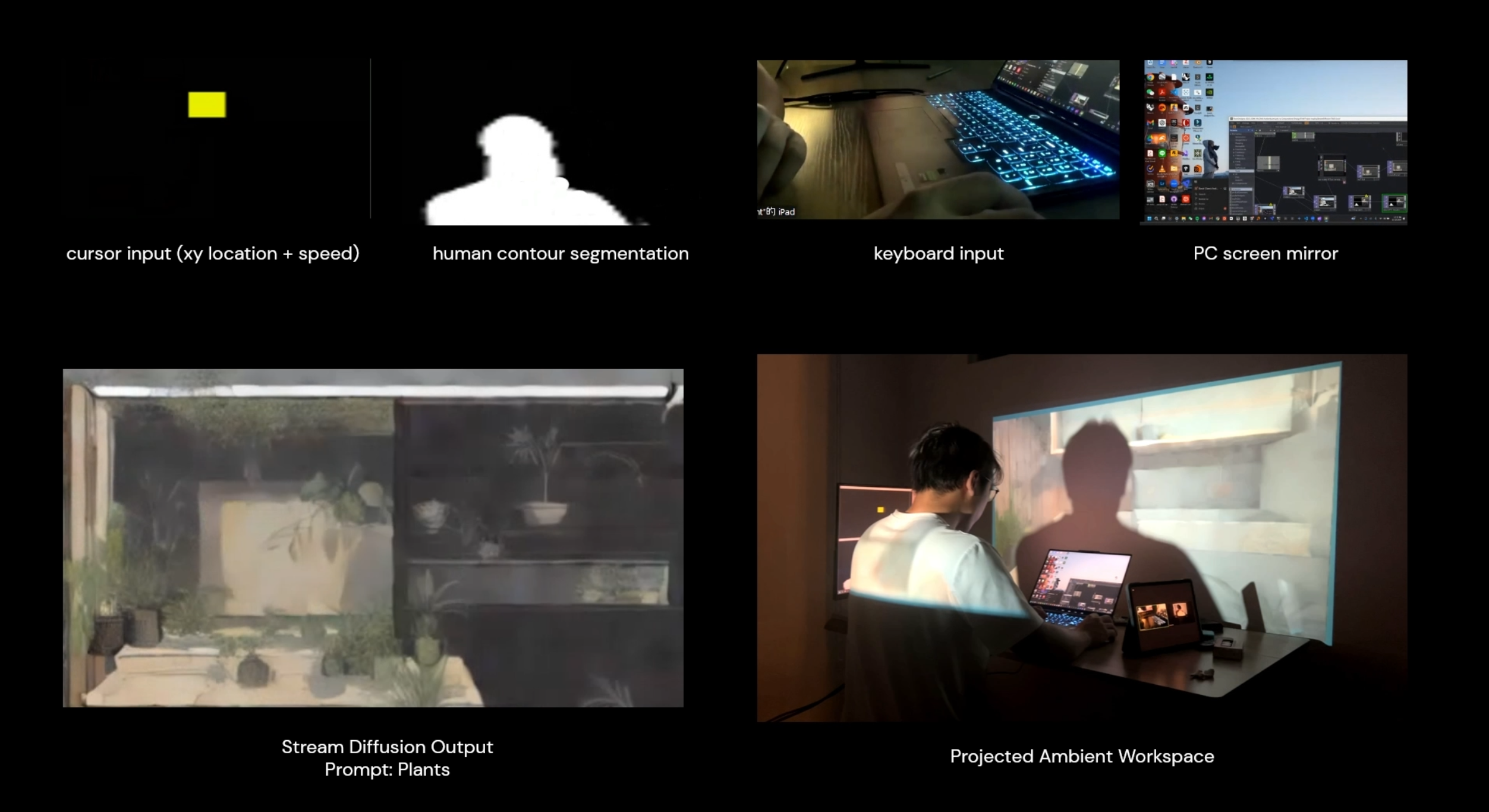
Cursor and keyboard data. Cursor position and movement speed, along with keyboard typing speed, are captured using Python libraries such as
pyQt5andpynput. This data is processed in a standalone Python script and sent to a TouchDesigner project file via the OSC module in TouchDesigner. -
Screen capture and image segmentation. The PC’s live screen is captured, and human contour segmentation is processed directly in TouchDesigner using the
mediapipe-touchdesignerintegration. MediaPipe emits the detected person as a bounding box plus a confidence score — the project’sdetection_data.jsonshows the shape of that per-frame payload (x,y,width,height,score), which the pipeline reads to place and mask the human contour before it reaches StreamDiffusion. These visual inputs provide additional parameters for the system to analyze and integrate into the generative output. -
Stream Diffusion pipeline. After pre-processing, the data is fed into the StreamDiffusion pipeline, which leverages Stable Diffusion for real-time image generation. With a predetermined text prompt, StreamDiffusion synthesizes all the inputs to create a sequence of images at around 16 frames per second. The result is not merely displayed on screen but projected back into the physical workspace, bridging the digital and ambient environments.
Projection and ambient feedback
The generative visuals are projected using a carefully configured system:
- Projection mapping — the output is mapped to the user’s surroundings. Using the CamShnapper module, the human contour is projected onto the user’s back while the remaining visuals are cast onto the workspace.
- Input integration:
- The PC screen defines the overall composition — window positions and icons influence the image layout
- The cursor generates a dynamic colored square; its size and dimensions correspond to cursor speed. This square acts as a standout object in the final image
- The human contour creates a large white area in the projection, contrasting with other colors to establish a distinct visual zone that can influence topology or foreground in the image
- The keyboard typing speed adds a crystallized texture layer to the projection, emphasizing dynamic user input
The system ensures each input contributes in a visually distinct way, making the relationships between input parameters and the generated visuals clear and observable.
Equipment setup
- Projector — for projecting the generated visuals onto the user and the workspace
- Laptops — to align and present processed input parameters
- DJI Osmo video camera — to capture the user’s movements and generate human-contour data
- Main computer — the central system for user interaction, running the computational pipeline and handling generative processes
The setup creates a seamless loop where user actions influence the generated visuals, which are then projected back into the environment, forming a dynamic feedback system that blends the physical and digital worlds.
Trials and generation results
Iteration 1 — Plants
Video: youtu.be/_m71EAxqBdY
For the first trial, I used the simple prompt “plant.” What stood out was how the system interpreted the straight lines of my computer’s window edges as architectural or interior elements, creating spaces to host the generated plants. The human contour often transformed into a table or light surface in the foreground, while the cursor input became a large, colorful plant.
It was fascinating to see how the cursor, as it moved across the screen, morphed into different plant forms. Because the projections were situated in real-world workspaces, some elements — like a lamp rendered by the cursor — seamlessly blended into the physical environment, feeling like natural extensions of the workspace.
Iteration 2 — Urban plan
Video: youtu.be/rtAv9rF6Qvg
For the second trial, I used “urban plan” as the prompt. Here the human contour consistently served as “negative” space, shaping the urban fabric that the StreamDiffusion model generated. Interestingly, the organic forms of human silhouettes were often transformed into rectangular sub-parts to align with the overall composition.
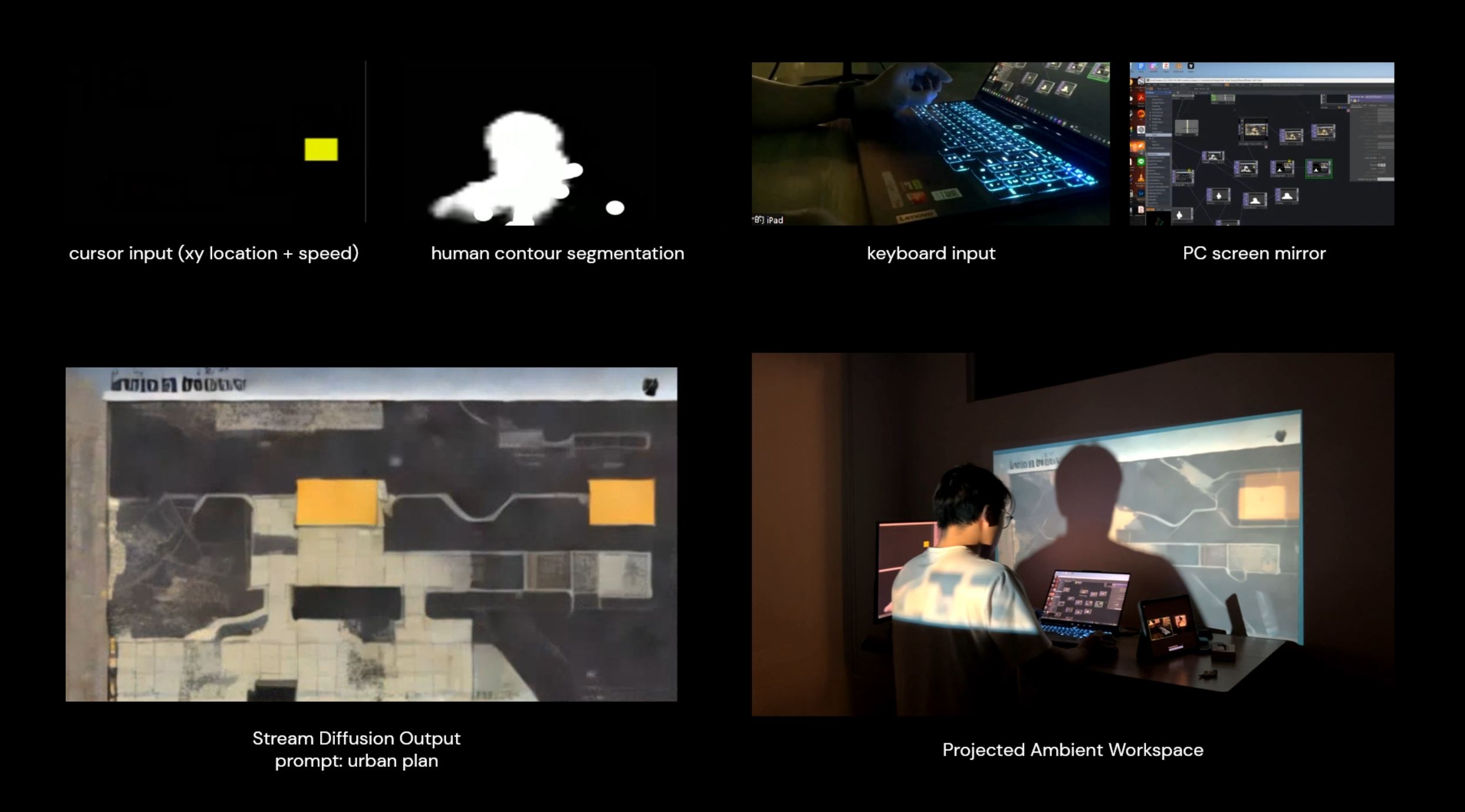
Although “urban plan” typically implies a flat, 2D output, the system occasionally produced perspective-style drawings — likely influenced by the layout of the computer windows combined with the user’s movement and contour position. Subtle changes in these compositions often led to strikingly different results.
Iteration 3 — Physarum screen interaction with urban plan
Video: youtu.be/OAg5alXv8xY
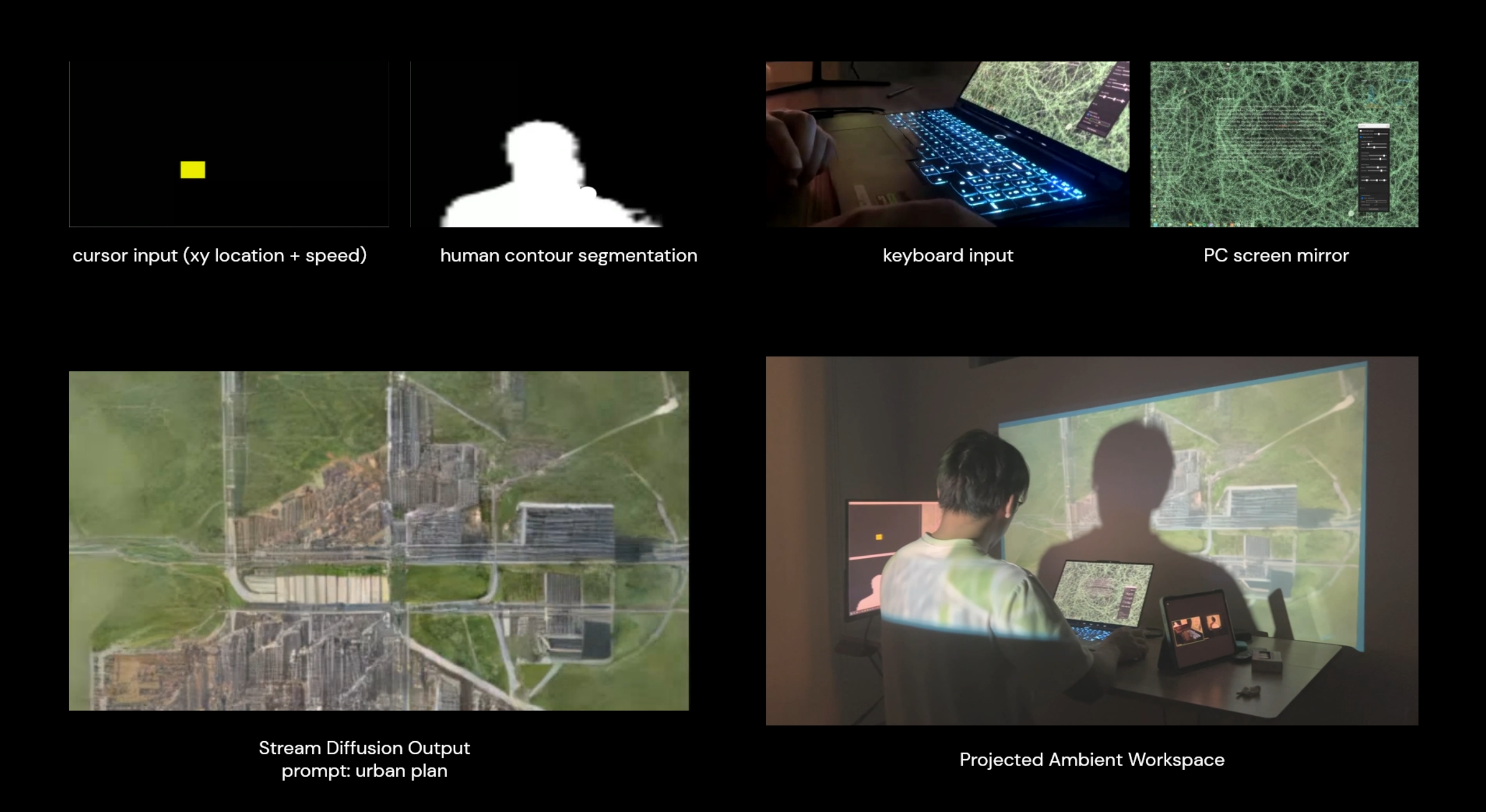
In the third trial I combined the earlier Physarum simulation with the “urban plan” prompt to create a layered result. The idea stemmed from previous studies linking Physarum’s efficient route-finding behaviors to urban layout design. I was curious to see how merging these two systems would affect the output.
While the correlation wasn’t immediately clear, the StreamDiffusion model did reconstruct Physarum trails as green spaces within the urban fabric. Untouched areas of the screen often became urban blocks, suggesting an emergent relationship between the simulation and the generated cityscape.
Reflection and further development
Project highlights and discoveries
This project demonstrated the potential to extend human-computer interaction beyond the confines of the computer screen, integrating the digital and physical realms. By projecting 3D-generated visuals onto surrounding surfaces such as white walls, the system transformed typically private digital interactions into shared, ambient experiences. This shift revealed how even subtle parameters — cursor movement, typing speed — could influence the generated output and contribute to a layered, interactive environment.
Through this process I became more mindful of the nuances in how I interact with the computer. Small changes in behavior — varying cursor speed, rhythm of typing — created noticeable differences in the generated visuals. This heightened awareness emphasized the significance of seemingly minor user actions, offering new perspectives on how interaction can shape outcomes in computational systems.
The project also aligns conceptually with world-making, as described in Nelson Goodman’s essay “Words, Works, Worlds.” Goodman’s methods — composition, decomposition, weighting, and framing — closely parallel how this system processes inputs. Interactions with the computer were decomposed into measurable parameters, reweighted, and reconstructed into cohesive visuals through the diffusion model. This framing allowed for an exploration of how everyday digital interactions could be reframed as creative, generative acts.
The project prompted a reconsideration of generative AI’s role in design. Previously I viewed AI as a tool that often operates beyond human control, leading to over-reliance on automated outputs. This framework allowed for a more collaborative interaction. The system wasn’t merely producing static results but facilitating a continuous feedback loop, where my inputs shaped the visuals in real time. That iterative process introduced a dynamic relationship between human agency and AI — reframing AI as a responsive partner rather than a deterministic tool.
Technical limitations
Despite its strengths, the project faced several technical constraints that limited execution:
- Projection setup. I initially planned to project visuals onto my body by wearing white clothing to enhance visibility. But the projector’s fixed focus, calibrated for the white wall, caused the image on my back to appear blurry. Similarly, when I used a white hat to extend projections to my head, the DJI Osmo camera failed to recognize me as a human figure, disrupting the system’s ability to process human contours.
- StreamDiffusion resolution. The output was restricted to 514 × 514 pixels due to performance considerations. While sufficient for smaller displays, this was inadequate for large-area projections, resulting in loss of visual clarity and detail.
Further development potential
- Expanding input modalities. Incorporating additional environmental inputs — lighting conditions, temperature, sound — could create a richer, multisensory interaction. Outputs could also extend beyond visuals to include auditory or tactile elements.
- Extended user studies. Longer-term observation would provide a deeper understanding of how projections influence user behavior and perception. How might ambient projections alter a user’s default interactions with their computer over time? How do others in the environment respond to or interact with the projections?
- Applications in design. The framework has potential for use in creative workflows — designers could engage with the system using body movements, mouse inputs, and keyboard actions to generate design outputs in real time. This could shift the act of designing from a purely cognitive task to a more embodied, interactive practice.
Links
- Notion page (original write-up + all figures)
- YouTube — main demo
- YouTube — iteration 1 (plants)
- YouTube — iteration 2 (urban plan)
- StreamDiffusion (dependency)
- MediaPipe-TouchDesigner (dependency)
- Local:
W:\CMU_Academics\Fall 2024 CMU\Mapping and TouchDesigner\Final Project\Final Project\
References
- Ashby, W. Ross. Design for a Brain: The Origin of Adaptive Behaviour. Springer Science & Business Media, 1952.
- Beer, Stafford. Brain of the Firm. 2nd ed., Wiley, 1981.
- Goodman, Nelson. Ways of Worldmaking. Hackett Publishing Company, 1978.
- Pask, Gordon. Conversation Theory: Applications in Education and Epistemology. Elsevier, 1976.
- Suchman, Lucy. Human-Machine Reconfigurations: Plans and Situated Actions. 2nd ed., Cambridge University Press, 2007.
Related cards
- [[spectral-facades]] — same team + course, earlier assignment that introduced the gesture-to-diffusion approach before this final project scaled it into full ambient projection