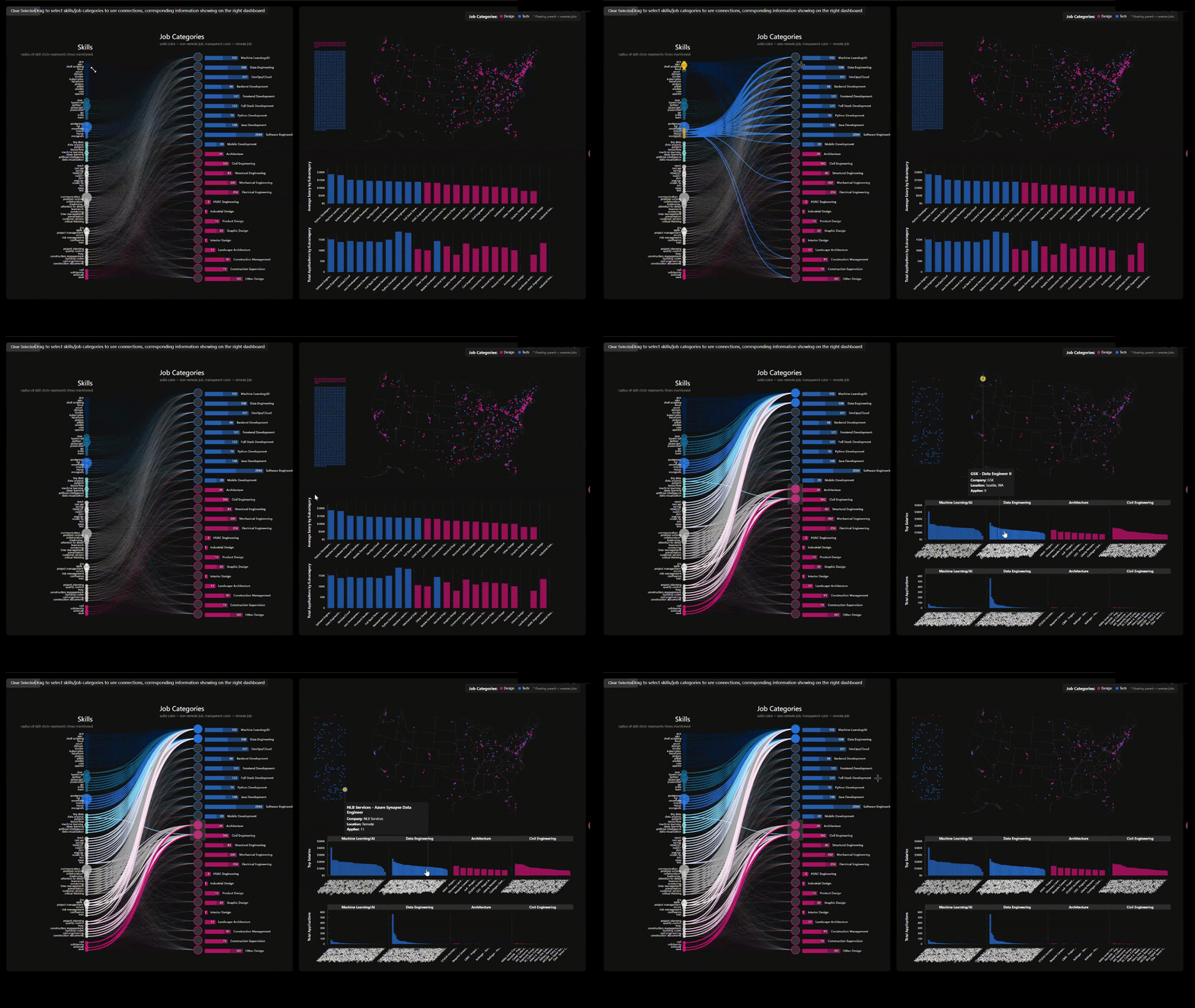
An interactive dashboard comparing tech and design job markets — revealing how skill requirements, salaries, and remote availability interplay across geography. Built for cross-field job seekers navigating the transition.
▶ Launch the live dashboard → · Team: David Chen, Risa Xie.
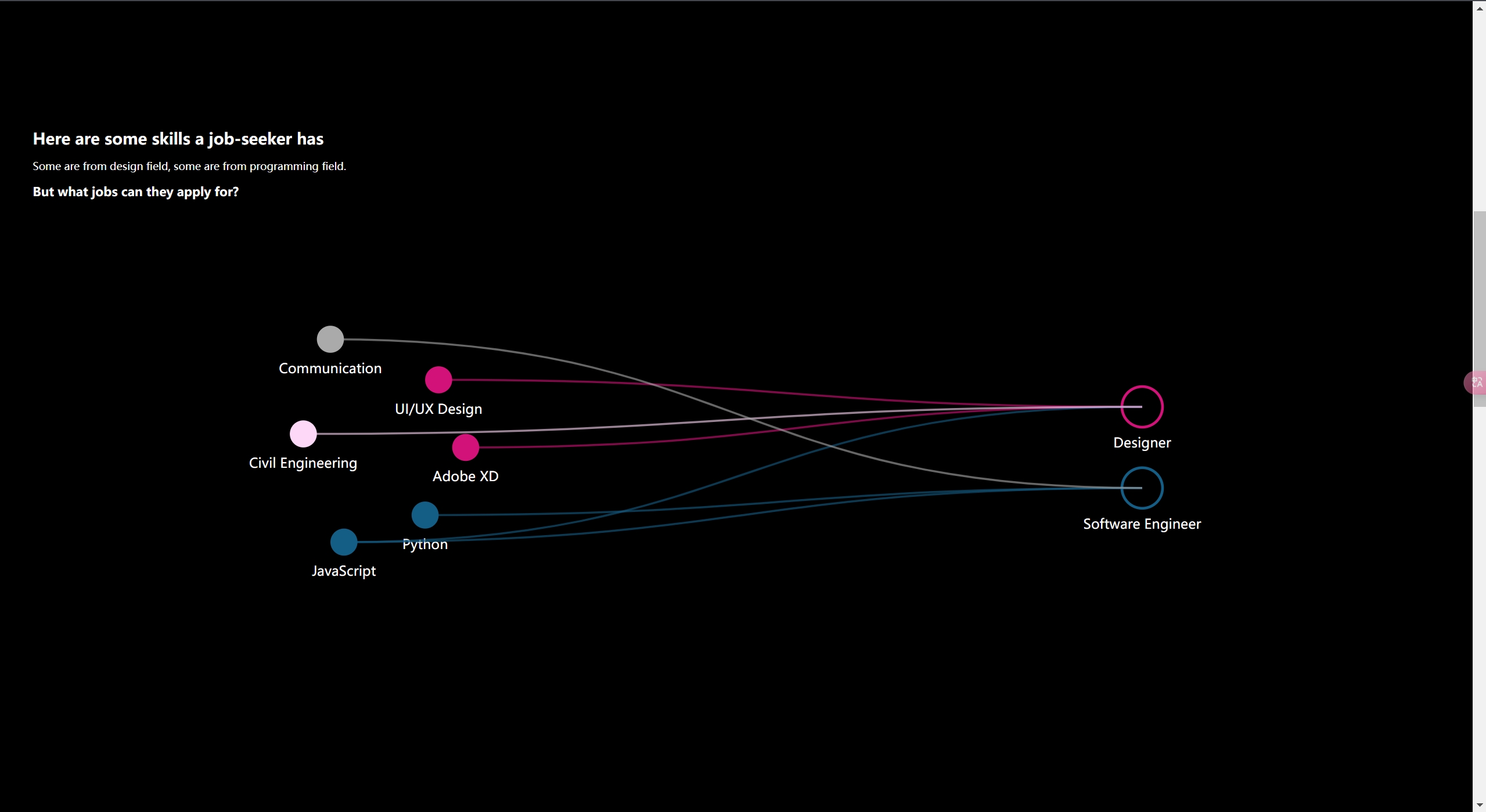
The dilemma for cross-field job seekers
The labor market is evolving at an unprecedented pace. Emerging technologies and shifting demands are driving individuals to acquire new skills and transition into unfamiliar fields. This is particularly evident among cross-field job seekers — those venturing into careers that differ significantly from their previous experience. They bring diverse perspectives, but often struggle to align their existing skills with what a target role actually requires, and to see where in the country that demand concentrates.
We built a data-driven view of how specific skills — particularly in tech and design — connect to job categories, alongside how salaries, competition, and geography vary across those roles. Starting from LinkedIn job postings collected in 2023, we extracted skills from job descriptions and organized them into nine overarching skill groups and 23 job categories spanning both a Tech and a Design track, using a consistent keyword-mapping process so the same skill string always resolves to the same node. The output is a single interactive interface that lets a career-changer start from a skill they already have — or a role they want — and follow the connections outward into demand, pay, and location.
What it is
Three linked D3 views over the same cleaned dataset, coordinated so a selection in one filters the others:
| View | What it answers | Technique |
|---|---|---|
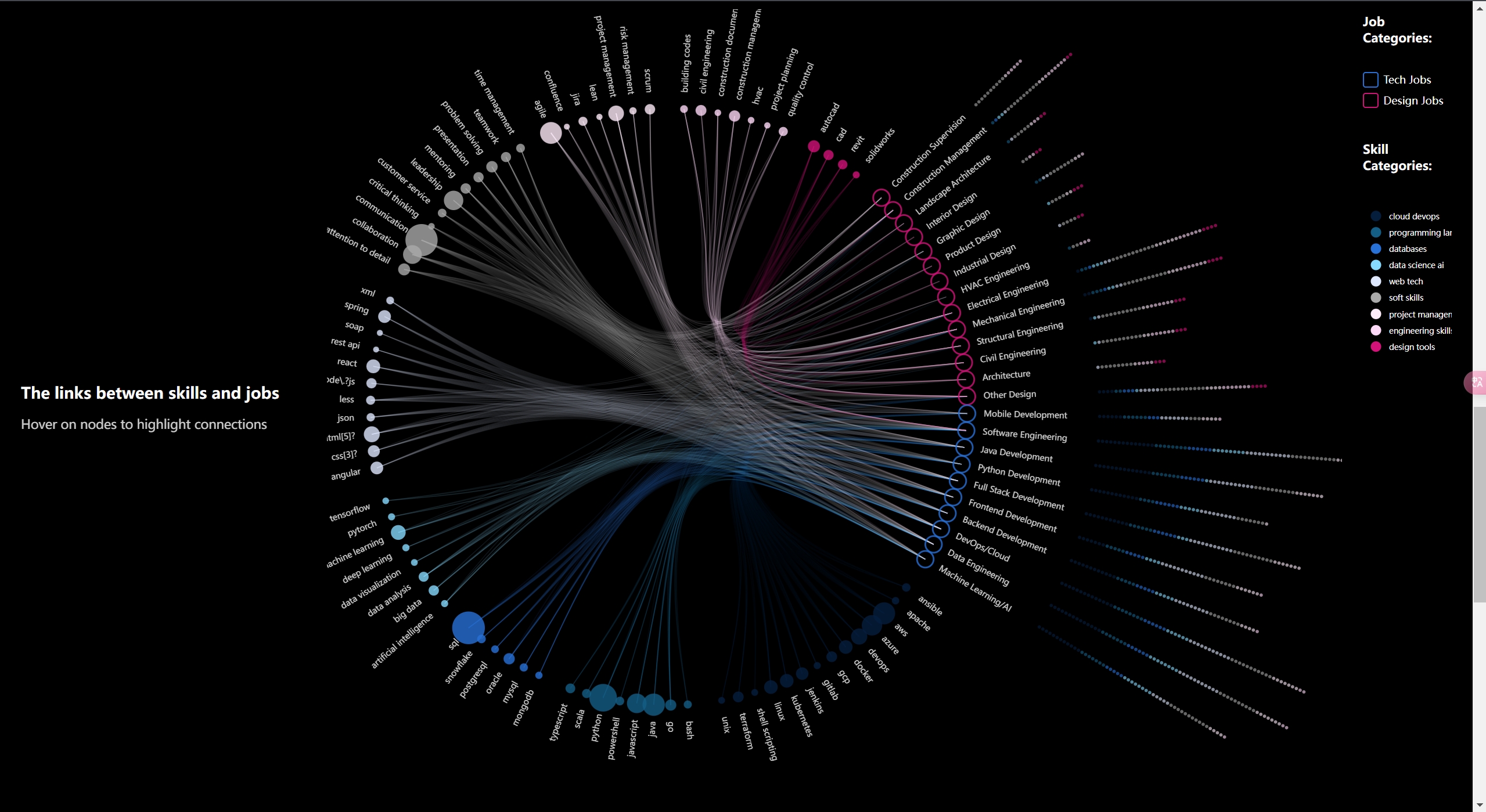
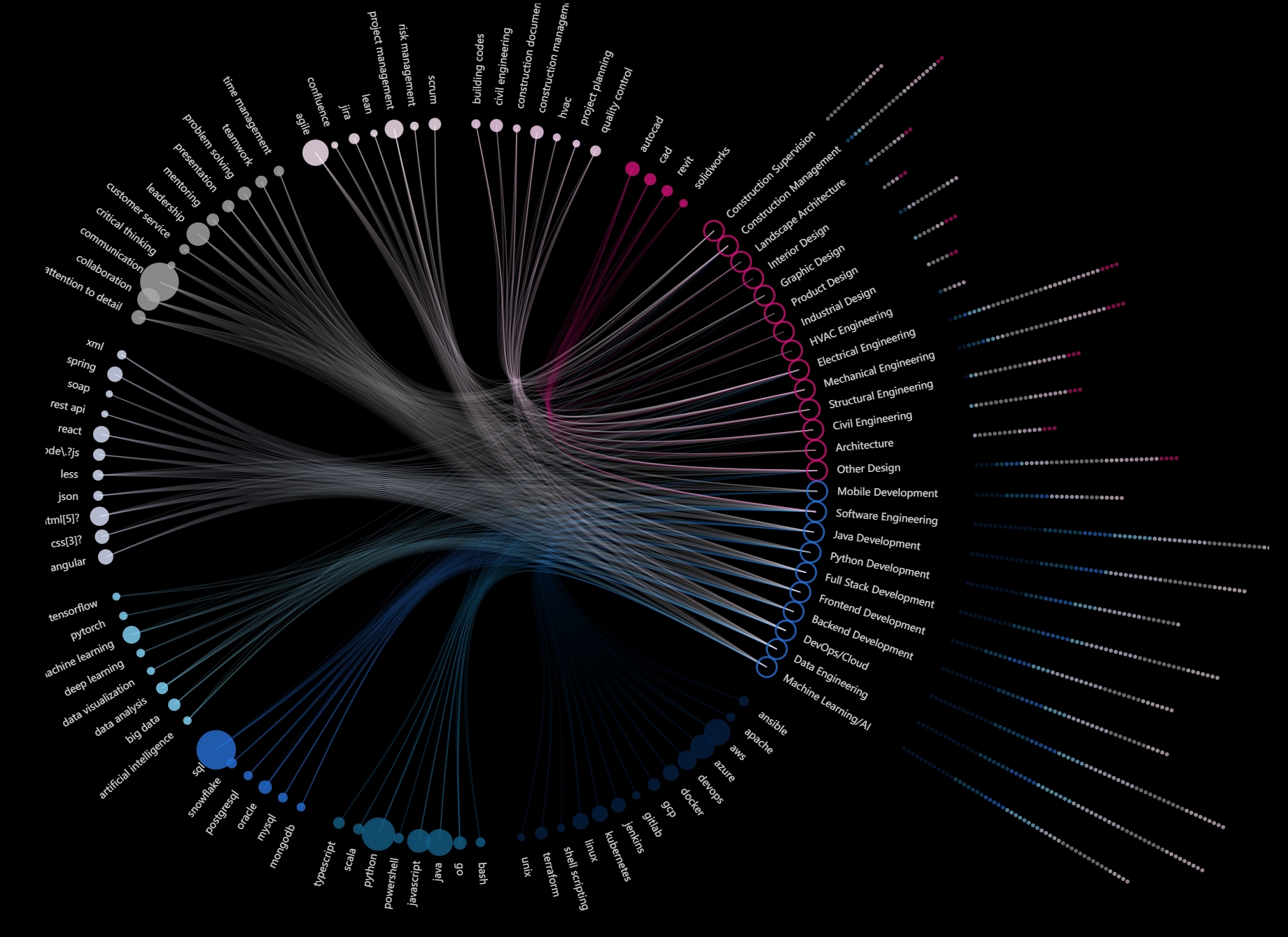
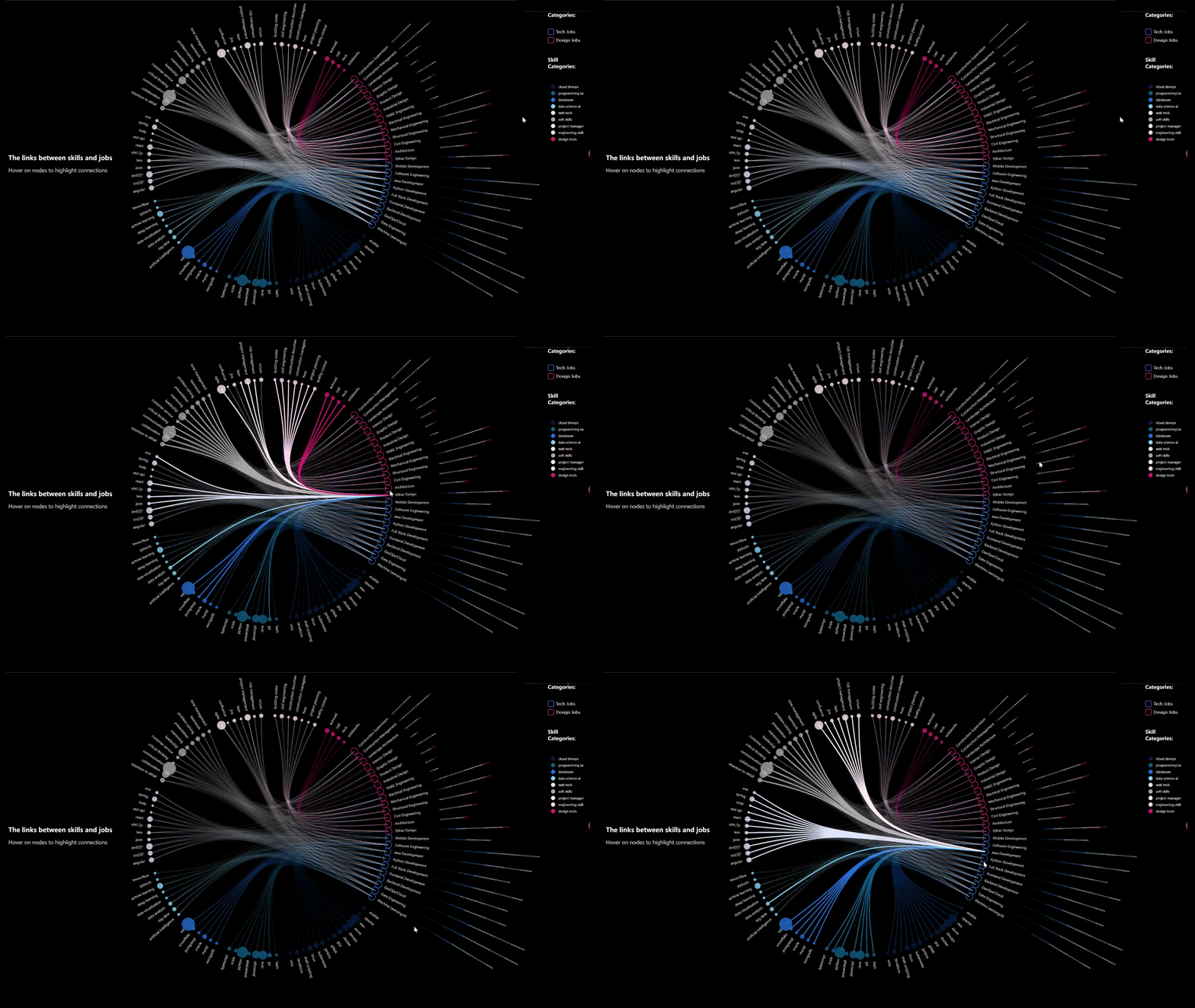
| Circular skill-job linkage | Which roles pull on both tech and design skills? | Radial hierarchical edge bundling (d3.cluster + curveBundle) |
| Geographic demand map | Where are these jobs, and which are remote? | Albers-USA projection over per-posting dot markers |
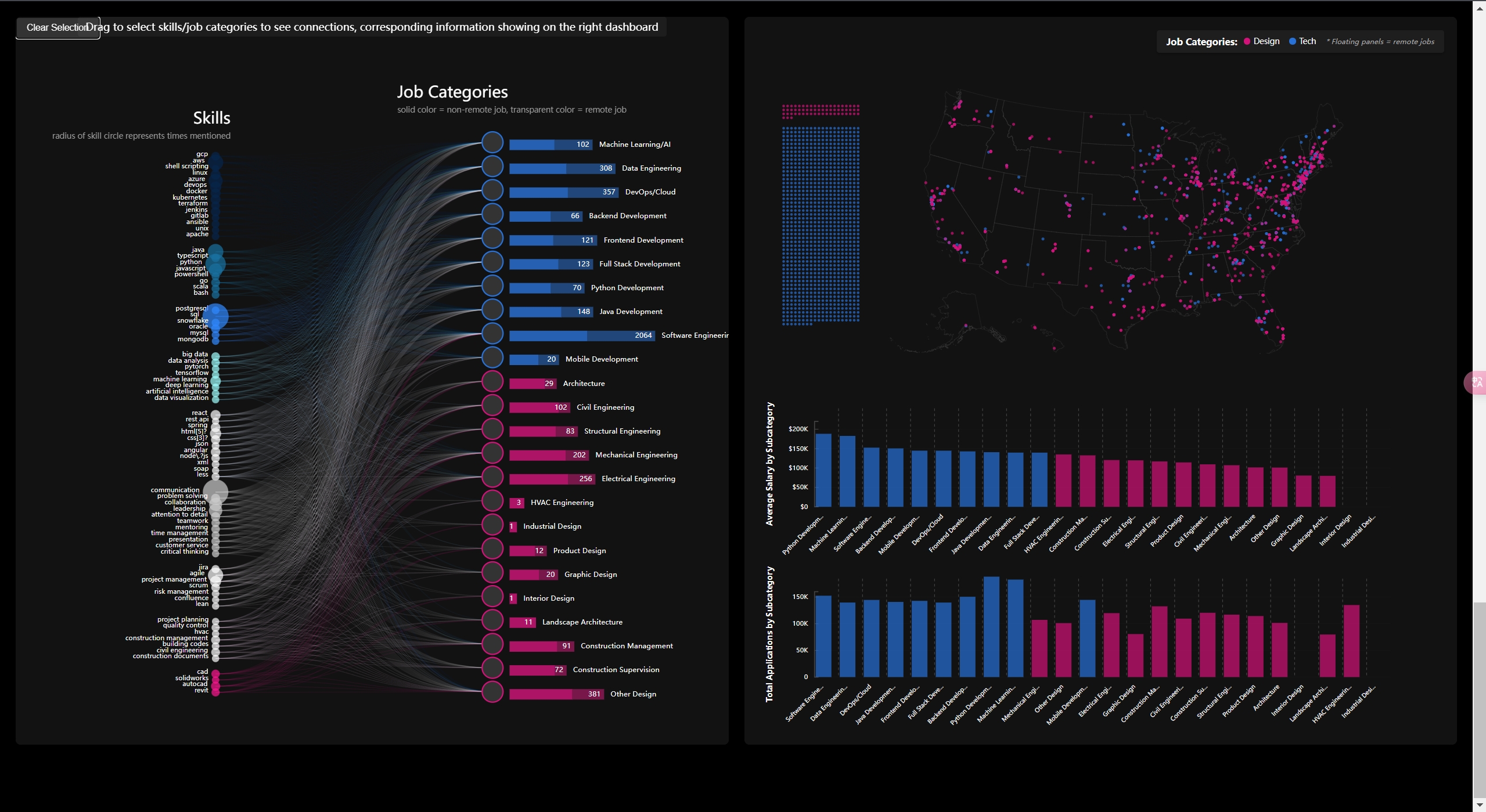
| Integrated dashboard | For a chosen role/skill: how many openings, what pay, how much competition? | Bipartite skill↔category graph + log-scaled count, salary, and application bars |
The data is real throughout — every dot on the map is a single posting with its own title, company, salary, and application count, surfaced on hover rather than aggregated away.
Architecture & data pipeline
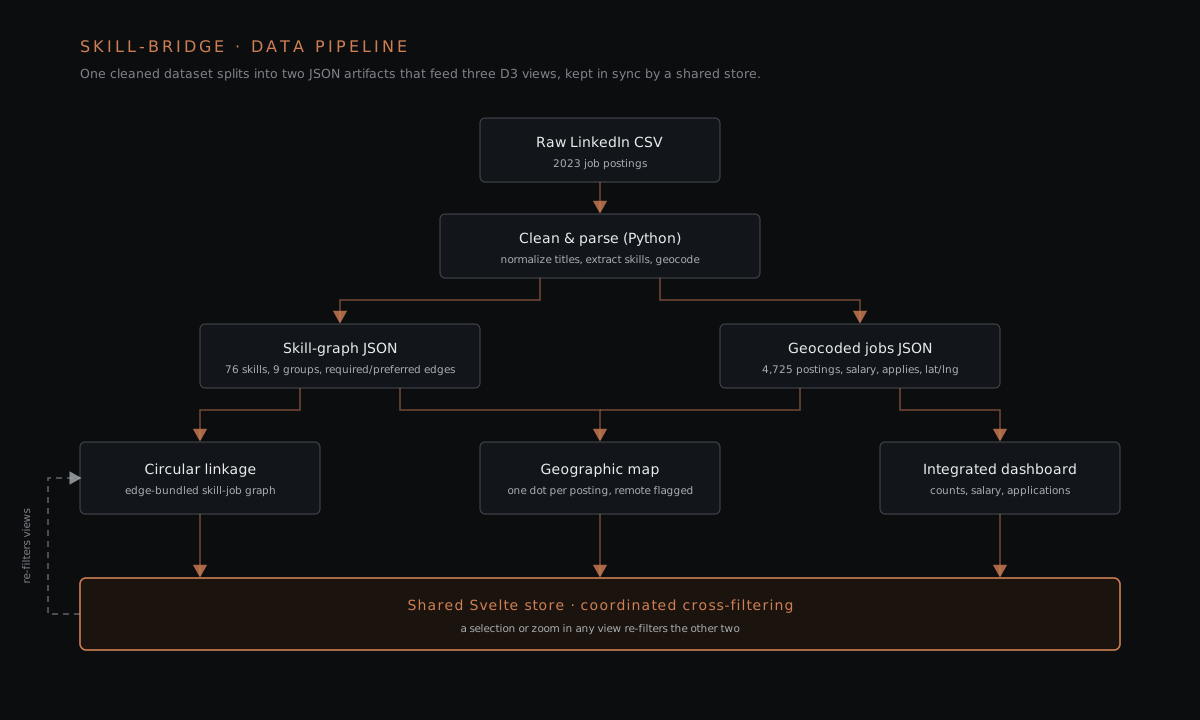
The interface is a SvelteKit app (Svelte 5, Vite 6) using D3 v7 for every visualization and topojson-client for the US basemap; it ships as a static build to GitHub Pages. Upstream of the app, the raw postings are cleaned and parsed in Python before anything reaches the browser.
Preprocessing. The raw ai_ml_jobs_linkedin.csv carries free-text title, location, company, description, and application-count columns. The pipeline (1) normalizes messy job titles into 23 categories by clustering them into a title_cluster / new_title and tagging each posting Tech or Design; (2) extracts skills from descriptions with a regex keyword-map, splitting them into required vs. preferred and tagging each by skill group; (3) normalizes heterogeneous pay strings into a single normalized_yearly_salary and keeps the raw application count; (4) geocodes each location to latitude/longitude (plus a FIPS code) and drops skills mentioned in fewer than 50 postings to cut long-tail noise.
Two artifacts drive the front end. The skill-graph file (filtered_nonpop_1129_50.json) holds 76 skills across 9 skill groups and 24 subcategory nodes, each skill carrying its own required / preferred connection list — this edge list is what both the circular graph and the dashboard render. The geocoded jobs file (jobs_with_coordinates_formatted_1113.json) holds 4,725 postings (3,423 Tech / 1,302 Design; 1,098 flagged remote), each with salary, application count, skills-by-category, and coordinates.
Coordinated views. Rather than three isolated charts, the views share a small set of Svelte stores — selectedSkills, selectedSubcategories, visibleJobs, cachedJobs, hoveredJobCategory. Selecting skills or categories in the dashboard writes to the stores; the map reacts by fading non-matching dots to ~5% opacity and rescaling its salary/application bars, and the linkage graph highlights the relevant edges. Zooming the map narrows visibleJobs by geographic bounds, which in turn filters what the dashboard summarizes. Category selection is capped at four to keep the comparison legible.
Selected engineering details
- Circular linkage (edge bundling). Skills and job categories are arranged on a radial
d3.clusterlayout; connections are drawn as bundled splines withd3.curveBundle.beta(0.85), so co-terminating edges visually group and the tech/design overlap on a role reads as edge density. Hovering a node raises its incident edges and dims the rest. - Geographic map. A
geoAlbersUsaprojection places one marker per posting over aus-atlasTopoJSON basemap; markers are colored blue (Tech) / pink (Design), remote roles are pulled into stacked side panels, and marker radius scales with zoom. State-level zoom-to-bounds and per-dot tooltips (title, company, location, salary) give the macro→micro drill-down. - Dashboard bars. Job counts per subcategory use a
d3.scaleLogso Software Engineering’s volume doesn’t flatten the smaller categories, split into remote vs. on-site segments. Salary and application bars sample down to a bounded number of bars per category and connect a hovered bar back to its dot on the map with a folded leader line.
Key results
Observation 1 — preference for both design and technical skills varies across job categories
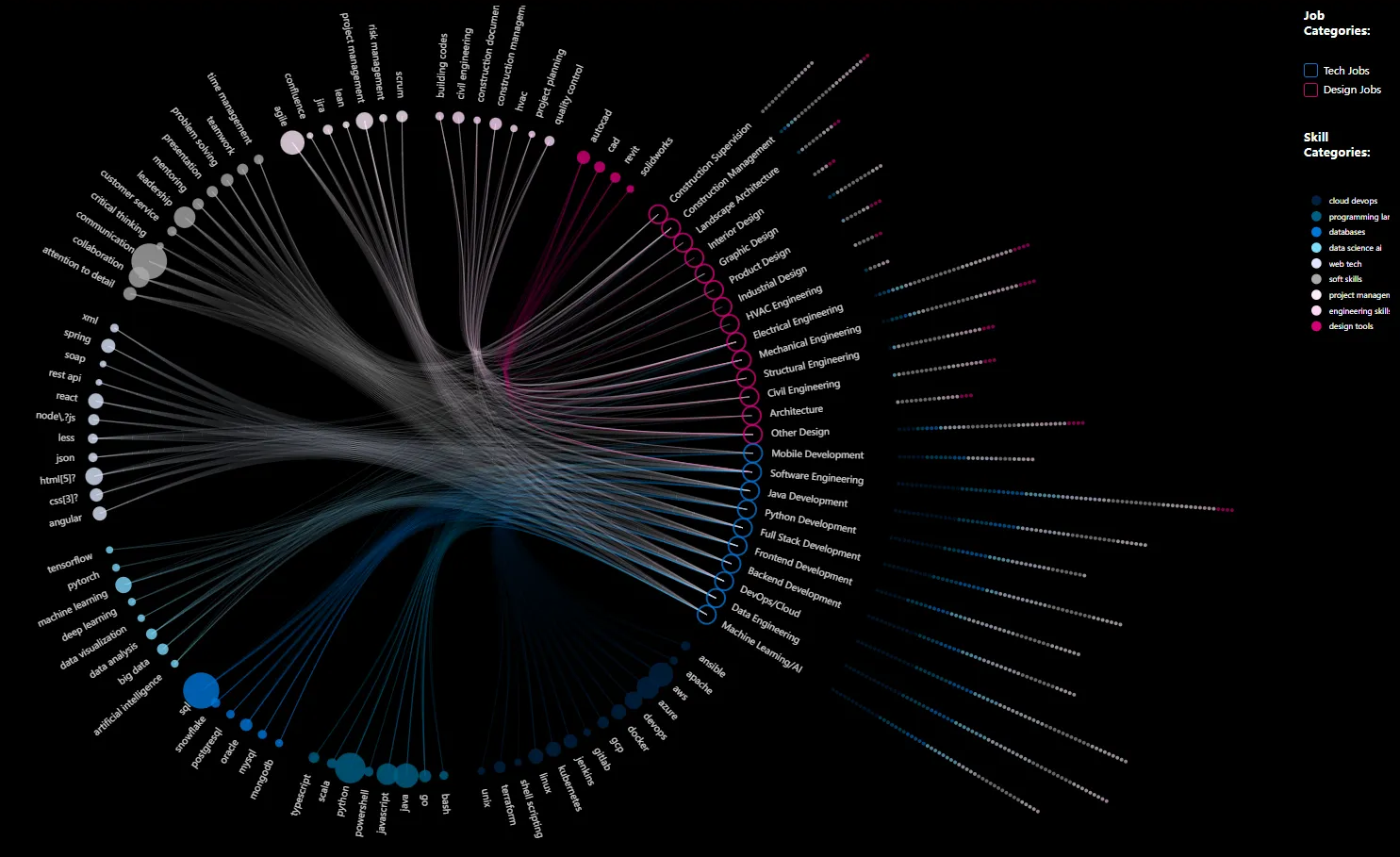
- Certain roles — Software Engineer in particular — demonstrate a strong preference for both technical and design skills, evident from the dense network of connections linking both skill types. Other roles like Interior Design predominantly emphasize design-specific skills with little to no overlap with technical skills.
- Overall, technical jobs tend to require a broader and more diverse set of skills than design jobs. This discrepancy could stem from:
- Tech stack variability — in technical fields, differentiation among tools and frameworks is pronounced. There are over 20 variations in software scaffolding tools alone (e.g. React, Angular, Node.js), whereas design focuses primarily on a few key solutions like Adobe and Figma
- Data bias — the dataset itself contains fewer design job postings than technical roles, leading to the omission of less frequently mentioned design skills (filtered out for having fewer than 50 mentions)
Observation 2 — tech jobs have more openings and more remote positions than design
To compare tech and design-related jobs by data count, we mapped total job counts in subcategories and their remote positions. We used a log scale to prevent software engineering from skewing results.
The data shows:
- Tech jobs significantly outnumber design job openings
- About half of tech positions offer remote work, compared to less than 20% for design
- Some design job categories have no remote positions in our sample dataset
- Software engineering leads the tech category with over 2,000 job postings
- Electrical and mechanical engineering are the largest design categories
Some categories show very low posting numbers — just 3 for HVAC engineering and 1 for interior design. The dataset isn’t comprehensive, but the trend pattern is robust.
Geographic distribution: Both design and tech jobs are concentrated in major cities along the east and west coasts, with the highest concentration on the east coast. Design jobs appear more frequently in the Midwest, where tech jobs are scarce. Design positions can also be found in smaller cities that lack tech job opportunities.
Observation 3 — tech jobs have higher salaries and more competition
- Average salary by subcategory: tech-related job categories command the highest average salaries, followed by design-related categories. Backend-related and algorithmically complex jobs offer the highest average salaries, with compensation decreasing toward front-end positions. Within design, technical engineering roles pay the most, while less technical positions like architectural designer and graphic designer have the lowest averages.
- Application volume: some tech job categories receive up to 500 applicants for a single role. Many tech subcategories including frontend development and Python development have at least 25% of positions attracting more than 50 applicants each.
- Design jobs cap at around 50 applications per posting, with the first quartile around 10 per opening. Design positions attract fewer applicants than tech roles.
- Salary distribution: top-paying tech positions can exceed $600,000 annually, with most roles clustering around $150,000. Design jobs cap at approximately $300,000, with the majority falling below $100,000.
Design decisions
Color coding for clarity and accessibility
Distinct colors differentiate between skill categories (tech, design tools) and job types (tech jobs in blue, design jobs in pink). This lets users quickly identify connections and trends at a glance. The consistent color scheme across the dashboard makes navigating complex data intuitive, reducing cognitive load.
Interactive link generation
Hover and multi-select functionality enables users to focus on specific nodes and highlight their direct connections. Users can dynamically explore the relationships between skills, job categories, and other variables. On the main panels we intentionally display only high-level categories to avoid information overflow — users seeking detailed insights can hover to view specific job postings. This balance ensures both macro-level clarity and micro-level depth, making the visualization adaptable to different user needs.
Integrated dashboard linking skills, jobs, geo-info, and salary
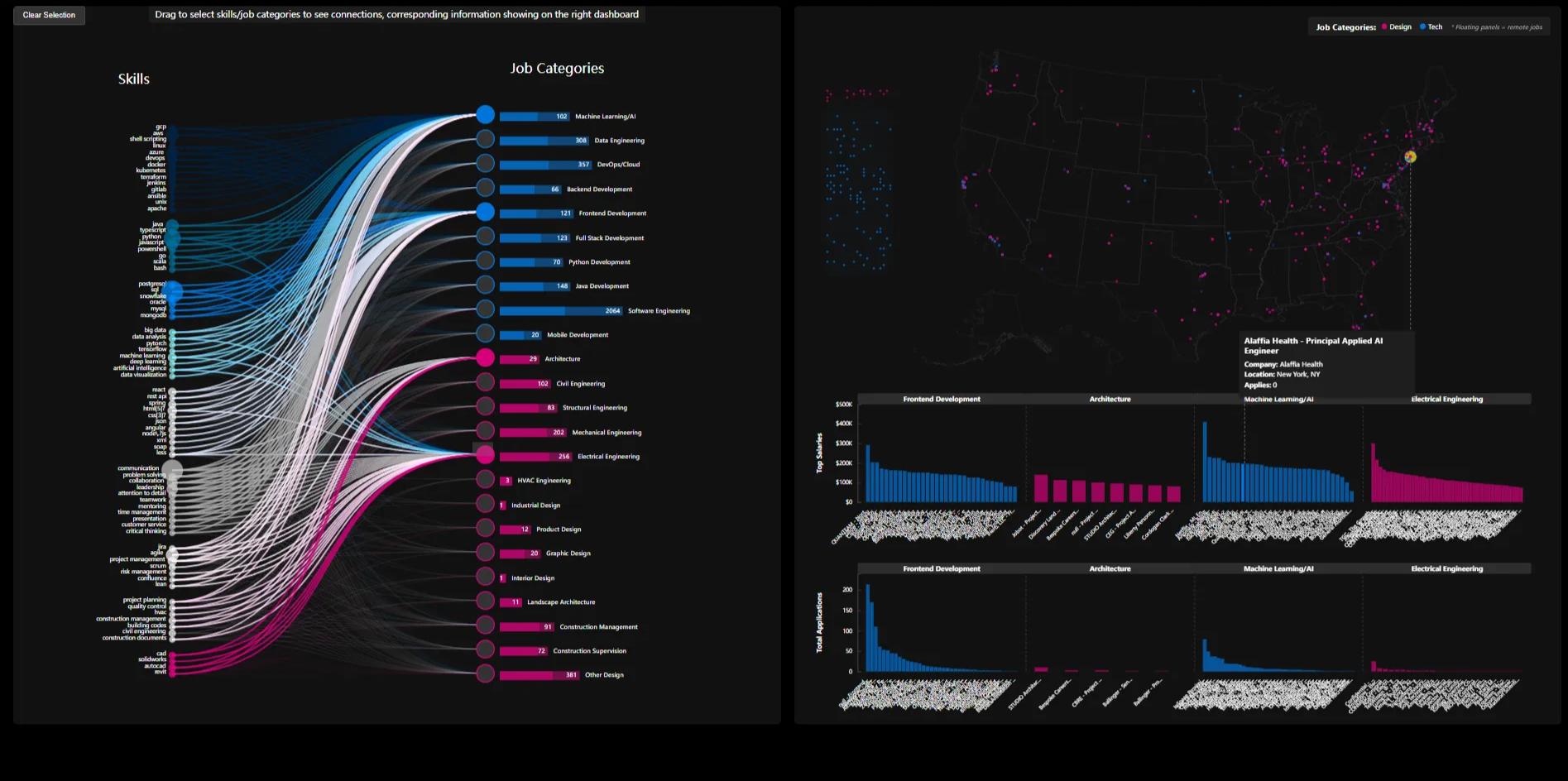
Multiple data dimensions are seamlessly connected — integrating skills and job categories with geographic distribution and average salary. This allows users to explore relationships holistically: how specific skills, job types, and their geographical and salary distributions relate. Interactive linking lets users see how salaries and job locations are interconnected, making it easier to grasp overall trends and variability. Users can compare jobs across categories and use the skill-job connections to understand how different locations impact compensation and opportunities.
My role
A two-person team with a flat structure (no group lead). The idea came from Risa’s own move from a design background into tech, and mine from a parallel transition. We sourced and cleaned the dataset together, and I led the data preprocessing — the title normalization, skill extraction, salary normalization, and geocoding that produced the two JSON artifacts the whole front end reads. On the visualization side, Risa built the circular edge-bundling diagram, I built the GeoMap, and we collaborated on the skill dashboard. Integrating the dashboard with the GeoMap was the hardest part — the two views had been built against differently-shaped data — so we handed that integration entirely to me, and I owned reconciling the data structures and wiring the shared-store cross-filtering that keeps the views in sync.
Reflection
We originally planned to analyze long-term trends but dropped that once it was clear there wasn’t comprehensive historical data to support it; focusing on a single recent year gave a cleaner, higher-quality snapshot of the current landscape instead. The honest limitation is dataset coverage — some categories bottom out at a handful of postings (3 for HVAC engineering, 1 for interior design), and the sub-50-mention skill filter drops real-but-rare design skills — so the interface is best read as a directional map of demand, not a census. Looking back, planning for one consistent data schema and more reusable components up front would have saved the painful late-stage GeoMap↔dashboard integration; that lesson is the reason the coordinated-store pattern here is something I’d reach for again.
Built for 05-619 Data Visualization, Fall 2024 — SvelteKit, D3 v7, LinkedIn 2023 job dataset.
Links
- Live demo
- GitHub repo
- Notion page (full findings + all figures)
- Local:
W:\CMU_Academics\Fall 2024 CMU\Data Visualization\Skill-Bridge-DataVis\